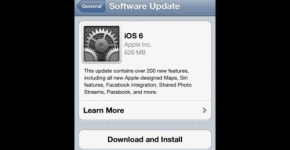

Apple just released the newest version of its operating system – the iOS 6. If you own an Apple device – iPhone, iPad, and iPod Touch – you could now download for free the iOS 6, install and upgrade your system!
Below is a step-by-step guide: Note: Make sure you are connected to a Wi-Fi network to do these steps!
1. Go and touch the “Settings” icon. The location of the icon depends on what iDevice you have.
2. Find the “General” tab of the Settings.
3. A new window will appear with “”Software Update”. Most likely, you will see a number 1. Tap it.
4. You will see iOS 6.0.0 software update if an update is available for your apple device. If an update is available, touch “Install Now”.
5. Touch “Agree” to agree to Apple’s Terms and Conditions. And the download plus installation begin…
6. Wait for the process to finish. Then you are done!
7. Final check: Go to “Settings”, “General”, “About”. You will see the latest iOS version installed on your device.